
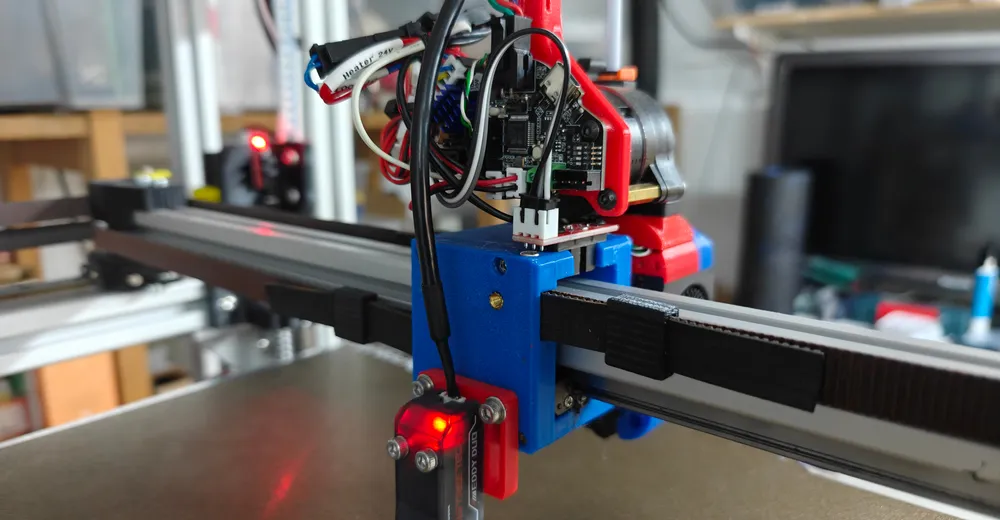
What has changed?
With the Klipper 2026 update, a fundamental change has occurred in the probe system: The parameter z_offset in the [probe_eddy_current] block is now deprecated. It is replaced by descend_z – a value with a completely different meaning.
While `z_offset` described the vertical offset between nozzle and sensor point, `descend_z` merely defines the **approach height** for the calibration process. The actual Z-offset is now internally accounted for via the calibration table.
Anyone who simply enters their old `z_offset` value into `descend_z` after the update risks a **nozzle crash into the bed**. This guide shows you step-by-step how to correctly adjust everything.
Ad · Affiliate link – if you buy through it, I may earn a commission. It doesn’t change the price for you.

Part 1: Proper Configuration (printer.cfg)
Make sure that your `[probe_eddy_current]` block looks exactly like this. The value `descend_z` is **not an offset**, but only the approach height for the calibration test:
[probe_eddy_current btt_eddy]
sensor_type: ldc1612
i2c_mcu: eddy
i2c_bus: i2c0f
x_offset: 0
y_offset: 74.0

# descend_z is the height the head moves to during calibration.
# 1.0 is safe. DO NOT set it to your old Z-offset!
descend_z: 1.0

samples: 2
samples_result: median
Important: A descend_z of 1.0 is a safe starting value – the head moves to 1 mm above the bed.
Prerequisites: What the homing macro needs
The macro from Part 2 is not a standalone snippet. It relies on three things that have to be in your config already. If they are missing, Klipper aborts on the very first G28 – typically with jinja2.exceptions.UndefinedError: 'GetStatusWrapper' object has no attribute 'gcode_macro SET_GCODE_OFFSET'. This section was added after the fact: two readers rightly pointed out in the comments that exactly these prerequisites were missing – thanks for that.
On my machine these blocks do not live in printer.cfg but in a separate btt_eddy.cfg, pulled in via [include ./btt_eddy.cfg]. Most of it ships with BTT's example config – it is simply commented out there.
1. Eddy as Z endstop and [safe_z_home]
The Eddy replaces the mechanical Z endstop. That means there is no fixed point where Z is zero any more – it measures wherever the head happens to be. So for homing it has to move over the bed first, and that is exactly what [safe_z_home] does: home X and Y, move to the center of the bed, then measure Z.
So safe_z_home is not a variable – it is an ordinary Klipper config section. The homing macro reads exactly one value from it: cf.safe_z_home.z_hop is the height the head returns to after measuring.
# Z endstop: the Eddy instead of a microswitch
[stepper_z]
endstop_pin: probe:z_virtual_endstop

# Homing position - the Eddy only measures over the bed
[safe_z_home]
home_xy_position: 199, 200   # bed center (398 x 400 here) - adjust to your bed
z_hop: 10                    # THIS is the value SET_Z_FROM_PROBE reads
z_hop_speed: 25
speed: 200
2. The SET_GCODE_OFFSET wrapper
Klipper itself has no runtime_offset – that variable does not belong to Klipper, it belongs to the Eddy package. It puts its own macro wrapper around Klipper's built-in SET_GCODE_OFFSET, renames the original to SET_GCODE_OFFSET_ORIG via rename_existing, and accumulates every bit of babystepping (Z_ADJUST) into the macro variable runtime_offset instead.
Only that makes both names the homing macro uses exist in the first place. Without this block, SET_Z_FROM_PROBE runs into exactly the error above.
[save_variables] and the RESTORE_PROBE_OFFSET timer belong to it: they restore the permanently stored offset from variables.cfg after every Klipper restart. Z_OFFSET_APPLY_PROBE from Part 5 is what writes it there.
# Storage for the permanent Z offset
[save_variables]
filename: ~/printer_data/config/variables.cfg

# Wrapper around Klipper's SET_GCODE_OFFSET.
# The original is called SET_GCODE_OFFSET_ORIG afterwards - exactly the
# name SET_Z_FROM_PROBE calls.
[gcode_macro SET_GCODE_OFFSET]
rename_existing: SET_GCODE_OFFSET_ORIG
variable_restored: False
variable_runtime_offset: 0
gcode:
  {% if params.Z_ADJUST %}
    SET_GCODE_VARIABLE MACRO=SET_GCODE_OFFSET VARIABLE=runtime_offset VALUE={ printer["gcode_macro SET_GCODE_OFFSET"].runtime_offset + params.Z_ADJUST|float }
  {% endif %}
  {% if params.Z %}
    {% set paramList = rawparams.split() %}
    {% for i in range(paramList|length) %}
      {% if paramList[i]=="Z=0" %}
        {% set temp=paramList.pop(i) %}
        {% set temp="Z_ADJUST=" + (-printer["gcode_macro SET_GCODE_OFFSET"].runtime_offset)|string %}
        {% if paramList.append(temp) %}{% endif %}
      {% endif %}
    {% endfor %}
    {% set rawparams=paramList|join(' ') %}
    SET_GCODE_VARIABLE MACRO=SET_GCODE_OFFSET VARIABLE=runtime_offset VALUE=0
  {% endif %}
  SET_GCODE_OFFSET_ORIG { rawparams }

# Restores the stored offset after every Klipper restart
[delayed_gcode RESTORE_PROBE_OFFSET]
initial_duration: 1.
gcode:
  {% set svv = printer.save_variables.variables %}
  {% if not printer["gcode_macro SET_GCODE_OFFSET"].restored %}
    SET_GCODE_VARIABLE MACRO=SET_GCODE_OFFSET VARIABLE=runtime_offset VALUE={ svv.nvm_offset|default(0) }
    SET_GCODE_VARIABLE MACRO=SET_GCODE_OFFSET VARIABLE=restored VALUE=True
  {% endif %}

# Writes the current runtime offset permanently to variables.cfg
[gcode_macro Z_OFFSET_APPLY_PROBE]
rename_existing: Z_OFFSET_APPLY_PROBE_ORIG
gcode:
  SAVE_VARIABLE VARIABLE=nvm_offset VALUE={ printer["gcode_macro SET_GCODE_OFFSET"].runtime_offset }
3. The G28 wrapper macro
And the link that is easy to miss: SET_Z_FROM_PROBE does not call itself. For it to take effect during homing, G28 is renamed as well and extended by two lines – home normally first, then a single PROBE, then set the Z zero point. The condition makes sure this only happens on a full G28 or a G28 Z, not on G28 X Y.
[gcode_macro G28]
rename_existing: G28.1
gcode:
  G28.1 {rawparams}
  {% if not rawparams or (rawparams and 'Z' in rawparams) %}
    PROBE
    SET_Z_FROM_PROBE
  {% endif %}
Part 2: The corrected Homing Macro
This was the cause of crashes for many users: The old macro subtracted `descend_z` from the measurement. The new Klipper handles the offset **internally via the calibration table**. Replace your old macro:
[gcode_macro SET_Z_FROM_PROBE]
gcode:
    {% set cf = printer.configfile.settings %}
    # Set Z to probe result + manual runtime offset
    SET_GCODE_OFFSET_ORIG Z={printer.probe.last_z_result + printer["gcode_macro SET_GCODE_OFFSET"].runtime_offset}
    G90
    # Move to safe Z height after homing
    G1 Z{cf.safe_z_home.z_hop}
What the macro does:
- Reads the Eddy measurement (last_z_result)
- Add your manual runtime offset
- Moves to the safe Z-hop height
What it **no longer does:** subtract `descend_z` – that was the bug.
Part 3: Basic Calibration (Frequency Mapping)
Before the Eddy can work precisely, it must learn what the bed underneath it looks like. This calibration creates a frequency-distance table.
Preparation
- Preheat bed to 60 °C
- Move printhead to the center of the bed
Start calibration
PROBE_EDDY_CURRENT_CALIBRATE CHIP=btt_eddy METHOD=paperProcess
- The head moves to Z = 1.0 (your
descend_zvalue) - Use the buttons in Mainsail or
TESTZ Z=-0.1to lower the nozzle - Paper between nozzle and bed – it should **be lightly gripped**
- Click on ACCEPT
- Type `SAVE_CONFIG`
Klipper writes a data table to the end of your `printer.cfg`.
Part 4: Temperature Compensation
Inductive sensors respond to temperature changes. Temperature calibration creates a correction table.
Prerequisite
The printer must be cold (room temperature). All heaters off.
Start calibration
TEMPERATURE_PROBE_CALIBRATE PROBE=btt_eddy TARGET=56 STEP=4Start heating manually
Since the command does not activate the heating itself:
SET_HEATER_TEMPERATURE HEATER=heater_bed TARGET=80Process
- Klipper prompts for a **paper test** → **ACCEPT**
- **Waiting:** The eddy warms up due to bed warmth
- At each stage (+4 °C): repeat paper test
- Continue until **target temperature (56 °C)** is reached
Completion
TEMPERATURE_PROBE_COMPLETE
SAVE_CONFIG
Tip: This process takes 30–60 minutes.
Part 5: Daily Operations
1. Homing (G28)
The eddy measures the distance. `SET_Z_FROM_PROBE` automatically sets the Z-zero point.
2. Bed Mesh
BED_MESH_CALIBRATEPerforms a rapid_scan – lightning fast, the head does not stop.
3. Fine-tuning
- Use the Z-Offset control in the Mainsail/Fluidd interface
- `Z_OFFSET_APPLY_PROBE` permanently saves to `variables.cfg`
Safety note for the first test
- Execute a **G28**
- Keep your finger on the emergency stop!
- Head moves up to about 10 mm
- ❌ **Stop:** Head goes to bed → old value in the calculation
Check: Does your macro still subtract descend_z? Did you re-run Part 3? Is there still an old z_offset in the config?
Summary
| What | Old (before 2026) | New (as of 2026) |
|---|---|---|
| Z-Offset in the Probe Block | z_offset: -1.54 | **Deprecated** – replace with `descend_z` |
| Approach height calibration | implicit | 1.0 |
| Offsetting | Manually in the macro | Internal via calibration table |
| Macro-Logic | last_z_result - descend_z | last_z_result + runtime_offset |
The changeover ultimately makes the system more robust and more accurate. The Eddy operates significantly more reliably after the new calibration.
Ad · Affiliate link – if you buy through it, I may earn a commission. It doesn’t change the price for you.


I get the following error:
Error evaluating 'gcode_macro SET_Z_FROM_PROBE:gcode': jinja2.exceptions.UndefinedError: 'extras.gcode_macro.GetStatusWrapper object' has no attribute 'gcode_macro SET_GCODE_OFFSET'
You don't give us the gcode_macro SET_GCODE_OFFSET.
I've added a new "Prerequisites" section before Part 2 with the full macro, plus [save_variables] and the G28 wrapper that actually calls SET_Z_FROM_PROBE - without that one the macro is never invoked at all. Sorry for the wasted debugging time.
The macro reads exactly one value from it: cf.safe_z_home.z_hop is the height the head returns to after measuring. I've added the section with my actual config - see "Prerequisites: What the homing macro needs".